Sandboxing Claude Code in a microVM with Docker sbx
Docker’s sbx CLI runs Claude Code inside a microVM. The sandbox has its own kernel, its own filesystem, its own Docker daemon, and the host filesystem is unreachable outside the workspace directory you mount.
So --dangerously-skip-permissions stops being scary, even when the next command Claude Code runs happens to be rm -rf on your home directory.
brew install docker/tap/sbx
cd ~/my-project && sbx run claude
The architecture
The sandbox has two ways to reach the host. A workspace folder for files, and a proxy for outbound network. Nothing else gets through.
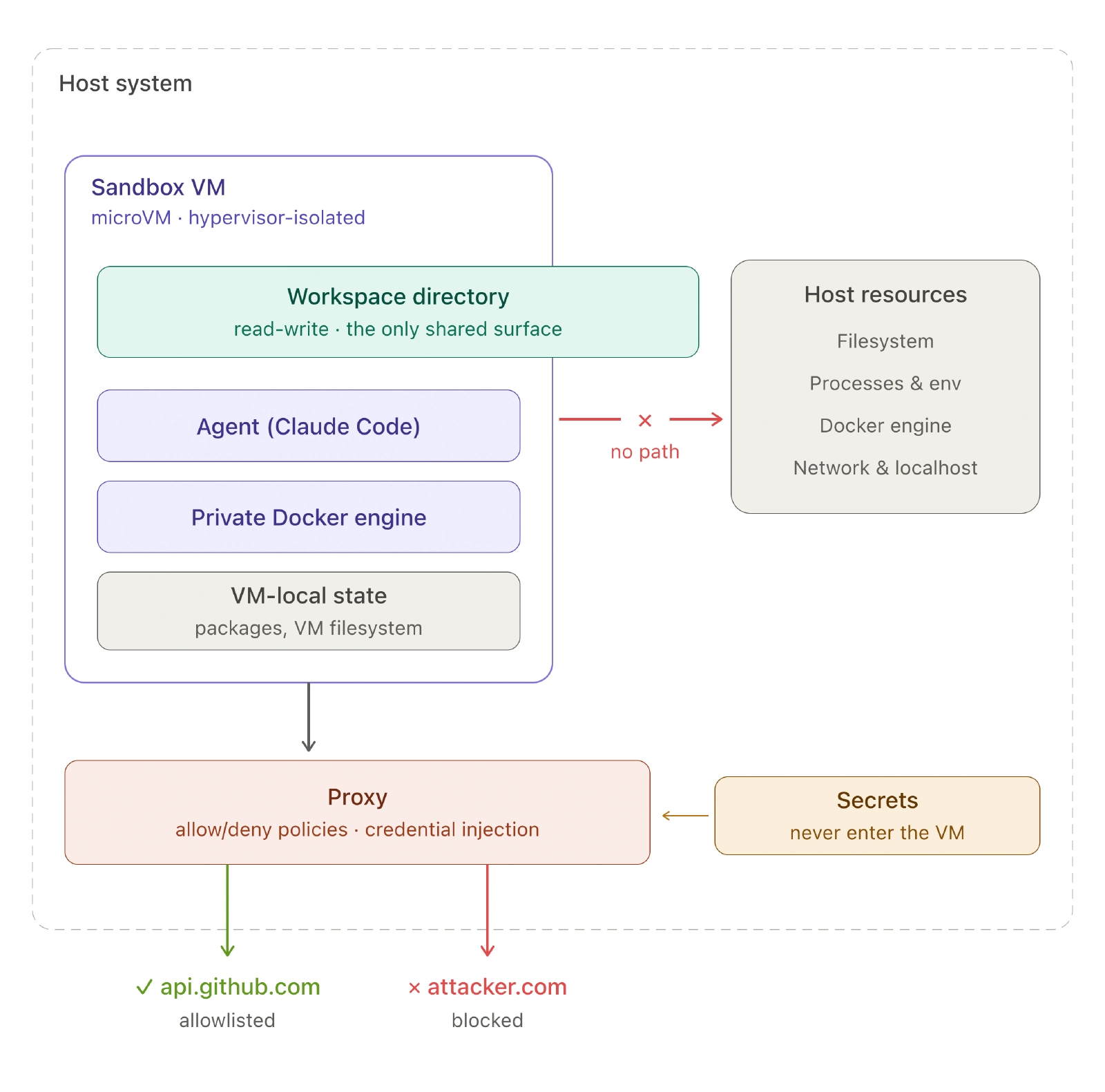
Two things make this different from “Claude in a Docker container”:
- Kernel isolation. A container escape gets you the host kernel. A microVM escape gets you nothing.
- All outbound traffic goes through a host-side proxy. HTTP and HTTPS can only reach domains you allow. Raw TCP, UDP, and ICMP are blocked at the network layer.
That proxy is where the interesting work happens.
The proxy does two jobs
Credential substitution. You store a secret on the host:
sbx secret set -g github -t "$(gh auth token)"Inside the sandbox, GITHUB_TOKEN holds a placeholder value like proxy-managed. The AI agent uses that env var as it normally would. On the way out, the proxy substitutes the real token for requests to api.github.com.
Custom services work the same way. Run sbx secret set-custom and the CLI generates a placeholder like sbx-cs-<rand>. The sandbox sees only the placeholder, and the proxy swaps in the real value on requests to the matching domain.
For SSH, SSH_AUTH_SOCK is forwarded into the sandbox, so private keys stay on the host.
Network policy. Three default modes (Open, Balanced, Locked Down) plus per-domain overrides. Denied requests come back with a clear reason:
HTTP/1.1 403 Forbidden
Blocked by network policy: domain api.mailgun.net:443
  detail: no matching allow rule — blocked by default deny policy
sbx policy allow network api.mailgun.net adds it. Or put it into a kit.
Kits
A kit is a YAML file that customizes a sandbox. The minimum useful one for a project:
schemaVersion: "1"
kind: mixin
name: my-project
displayName: My project dev stack
description: Toolchain + network allowlist for my project.

commands:
  install:
    - user: "1000"
      description: Install Rust stable
      command: |
        curl --proto '=https' --tlsv1.2 -sSf https://sh.rustup.rs | \
          sh -s -- -y --default-toolchain stable --profile default

network:
  allowedDomains:
    - "crates.io:443"
    - "static.crates.io:443"
    - "index.crates.io:443"
    - "static.rust-lang.org:443"
The install commands run once when the sandbox is created. Here they bootstrap Rust stable as the agent user. The allowedDomains list lets rustup reach the domains it needs. Without it, the install would fail under the default-deny policy.
Load it with sbx run claude --kit ./.sbx/my-kit.
The dashboard
Running sbx with no arguments opens a dashboard listing every sandbox, its state, and resource usage. Useful when you’ve left things running.
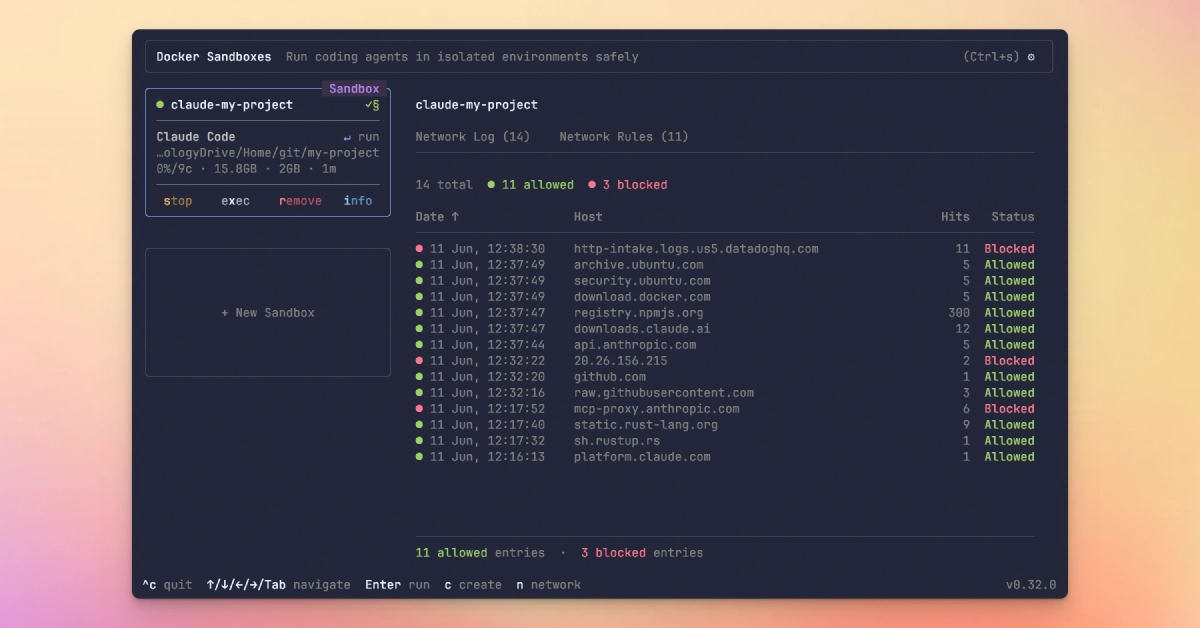
sbx with no arguments opens the dashboardNotice that even mcp-proxy.anthropic.com shows up as blocked. The proxy makes no exception for the agent’s own vendor. Anything not in your allowlist stays out.
Syncing your ~/.claude
Your host’s ~/.claude is not mounted. Slash commands, skills, hooks, and the global CLAUDE.md won’t be there unless you copy them in. A small wrapper handles create-or-reuse, sync, and attach in one go:
#!/usr/bin/env bash
set -euo pipefail

sandbox="claude-my-project"

sbx ls --quiet | grep -qx "$sandbox" || \
  sbx create claude --name "$sandbox" --kit ./.sbx/my-kit .

for item in commands skills agents hooks CLAUDE.md settings.json; do
  [ -e "$HOME/.claude/$item" ] || continue
  sbx cp "$HOME/.claude/$item" "$sandbox:/home/agent/.claude/"
done

sbx run "$sandbox"
The tool is still experimental, and a non-trivial project will need a custom kit. Docker keeps a community kit repo with reusable mixins worth borrowing from before writing your own.