Let a GitHub Action Download the Right Prebuilt Binary
If your GitHub Action runs a compiled program, it can download a prebuilt binary instead of building it on every run. To pick the right release, it needs to know which version the workflow asked for, the v0 in uses: owner/action@v0.
GitHub has a variable for this, github.action_ref, but it can be empty or hold another action’s version. The path to the action’s own code is more reliable. The runner downloads that code to a folder named after the version and gives the action’s steps its path in $GITHUB_ACTION_PATH.
Who’s who
I recently built rotguard , a link checker that rewrites redirected and dead links. It runs on this blog every week. Each run involves 3 things:
- workflow is a YAML file in the blog’s repo,
.github/workflows/rotguard.yml. One of its steps saysuses: rdiachenko/rotguard@v0. - runner is the machine GitHub starts to run that workflow.
- rotguard is the action. Its
action.ymllives in a separate repo and lists the shell steps the runner runs inside the workflow’s job, as if the workflow had listed them itself.
Download or build
rotguard is written in Rust, so it needs a binary on the runner before it can check any links. Building it from source took 22 to 36 seconds with a warm build cache and about 2.5 minutes without one. Downloading and installing it from a GitHub release took about a second.
Whether rotguard downloads the binary or builds it depends on what comes after @ in the workflow’s uses: line. That value is a git ref, such as a tag (v0), a branch (main) or a commit SHA. For @v0, rotguard downloads the binary for the release that v0 points to. For @main, it builds from source.
Why github.action_ref isn’t enough
GitHub puts the ref in github.action_ref. In a composite action like rotguard, it has 2 problems:
- It’s empty when you use
${{ github.action_ref }}directly inrun:. To read it from a shell step, pass it through the step’senv:. - If another action calls rotguard,
github.action_refcan hold that action’s ref ( actions/runner#2473 ). If a wrapper action pinned to@v1callsrotguard@main, rotguard seesv1and tries to download a release binary instead of buildingmain.
Reading the ref from the folder path
Before the job starts, the runner downloads rotguard’s code to a folder whose path ends with the ref. For @v0, the path looks like this:
/home/runner/work/_actions/rdiachenko/rotguard/v0rotguard’s steps get this path in $GITHUB_ACTION_PATH and use it to find files such as Cargo.toml. The ref is the part of that path after _actions/<owner>/<repo>/:
ref="${GITHUB_ACTION_PATH#*/_actions/*/*/}"If a branch name contains a slash, reading only what comes after the final / gives you an incomplete ref. A branch called release/v0.2.0 gets this path:
/home/runner/work/_actions/rdiachenko/rotguard/release/v0.2.0Reading only v0.2.0 would make rotguard try to download a release binary instead of building the branch, because v0.2.0 looks like a release tag. The # expansion removes the shortest prefix that matches the pattern. Here that prefix ends at rotguard/, leaving the full ref release/v0.2.0.
Figure 1 shows the whole run. Either way, the binary ends up where the last step expects it.
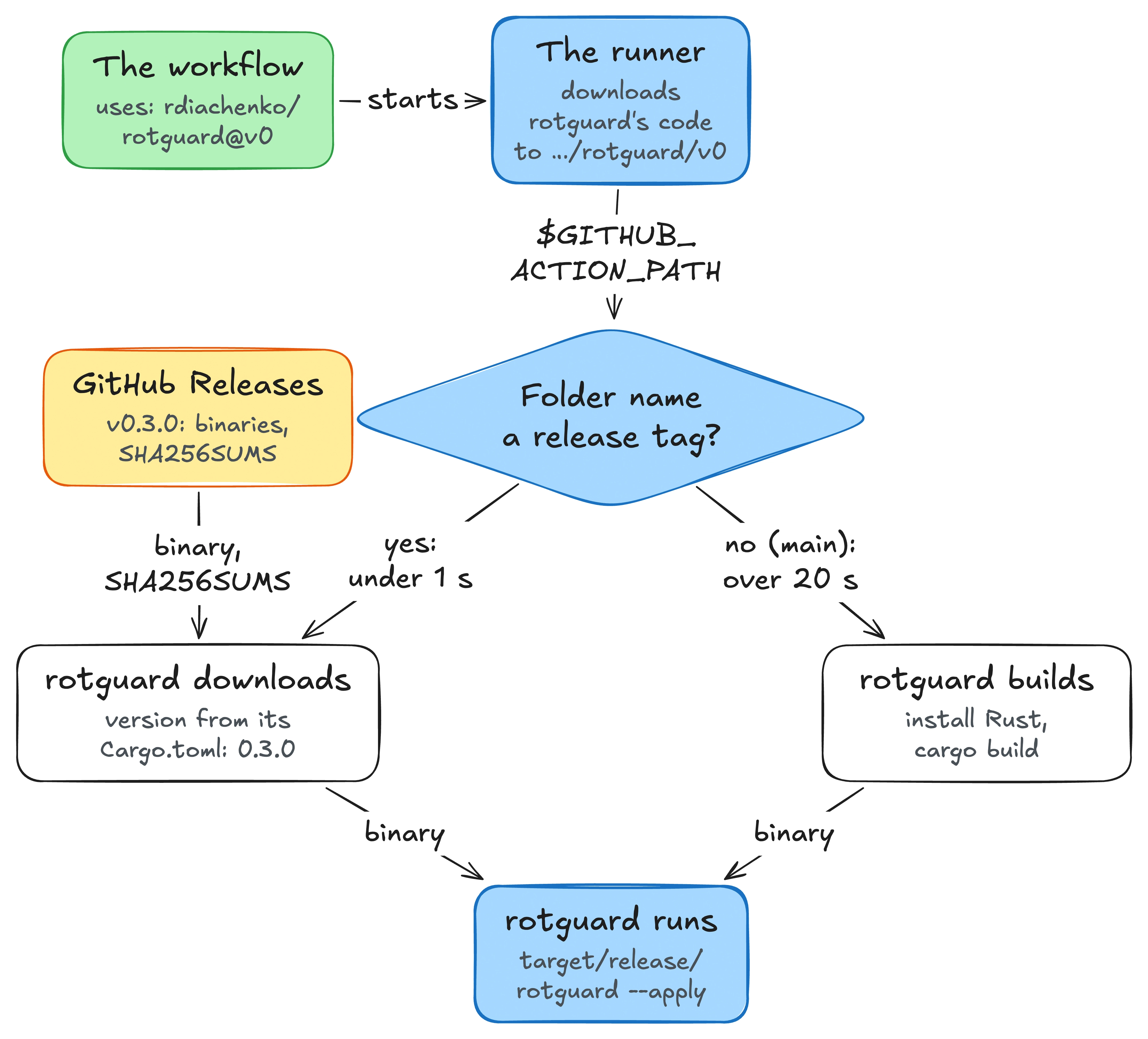
rdiachenko/rotguard@v0, from the workflow’s uses: line to the step that runs the binaryThe download step
Here’s the first step from rotguard’s
action.yml
, with the error messages omitted and shorter curl flags. It tries to download a binary if the ref looks like a release tag (v0 or v0.3.0) and the runner is on Linux with an x64 or ARM64 CPU. Otherwise, it sets mode=build:
- id: fetch
  shell: bash
  run: |
    ref="${GITHUB_ACTION_PATH#*/_actions/*/*/}"
    ref_pattern='^v[0-9]+(\.[0-9]+\.[0-9]+)?$'
    target=''
    if [[ $RUNNER_OS == Linux && $ref =~ $ref_pattern ]]; then
      case "$RUNNER_ARCH" in
        X64) target=x86_64-unknown-linux-musl ;;
        ARM64) target=aarch64-unknown-linux-musl ;;
      esac
    fi
    if [ -z "$target" ]; then
      echo "mode=build" >> "$GITHUB_OUTPUT"
      exit 0
    fi
    version=$("$GITHUB_ACTION_PATH/scripts/cargo-version.sh" "$GITHUB_ACTION_PATH/Cargo.toml")
    asset="rotguard-$version-$target"
    base="https://github.com/rdiachenko/rotguard/releases/download/v$version"
    cd "$RUNNER_TEMP"
    curl -fsSL --retry 3 --max-time 120 -o "$asset" "$base/$asset"
    curl -fsSL --retry 3 --max-time 120 -o SHA256SUMS "$base/SHA256SUMS"
    grep -F " $asset" SHA256SUMS | sha256sum -c -
    mkdir -p "$GITHUB_ACTION_PATH/target/release"
    install -m 755 "$asset" "$GITHUB_ACTION_PATH/target/release/rotguard"
echo "mode=release" >> "$GITHUB_OUTPUT"- The build steps that follow use
if: steps.fetch.outputs.mode == 'build', so they run only when the fetch step setsmode=build. - The fetch step puts the binary where
cargo build --releasewould put it, so the last step can use the same path either way. - The fetch step sets
shell: bash, which the runner starts asbash --noprofile --norc -eo pipefail, so a failed download or checksum check fails the job. A missing release binary shouldn’t pass quietly. - A branch named
v1also matches the pattern, so on a supported runner rotguard tries to download a release binary for that branch.
Where the version comes from
The v0 in the uses: line does more than pass the pattern check. It decides which commit of rotguard the runner downloads. v0 is a tag that moves to each new 0.x release, and today it points at the “Release 0.3.0” commit. The runner’s log shows it:
Download action repository 'rdiachenko/rotguard@v0'
  (SHA:8bd224b18bc8cf10c1cbfc8239f3f4d8113b17bc)
The Cargo.toml in that commit says version = "0.3.0", so the fetch step asks for rotguard-0.3.0-x86_64-unknown-linux-musl. With @v0.2.1, the runner downloads the commit tagged v0.2.1, and the step gets the 0.2.1 binary. The name v0 stays the same across releases, so the step gets the exact version from the Cargo.toml that came with the code.
This only works if the release binaries are available before v0 moves. rotguard’s
release workflow
runs when a vX.Y.Z tag is pushed. It checks the tag against Cargo.toml, builds both Linux binaries, publishes them with SHA256SUMS, and moves v0 to the new commit last. If it moved v0 to the 0.4.0 commit first, a job could pick up that commit, read 0.4.0 from Cargo.toml, and try to download a binary that doesn’t exist yet.
The result
Here’s how long it took to get the binary ready in the same weekly job before and after switching to @v0.
@main, cold cache   2.5 min     install Rust, build
@main, warm cache   22-36 s     install Rust, restore the cache, build
@v0                 0.4-1.0 s   download, check the checksum, install
This relies on the runner’s folder layout. If the layout changes and rotguard stops finding a ref that looks like a release tag, it builds from the code the runner downloaded. That takes longer, but the job still runs the requested version.